
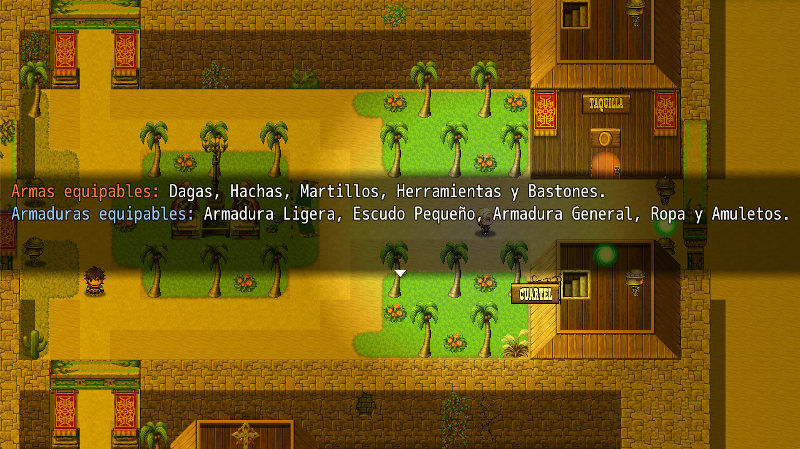
The “Show Equipment” plugin has been developed specifically for the video game Quintaesencia, a title currently in development that you can download for free on Steam. With this plugin, players will be able to clearly see which weapons and armor each character can equip, enhancing the gaming experience.
Main Features of Show Equipment
- Easy to install: Simply copy the .js file into the correct folder.
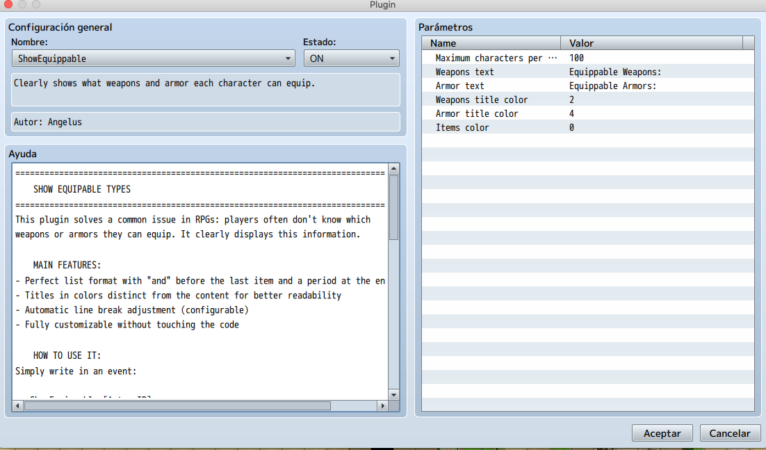
- Customizable settings: Allows you to adjust the maximum number of characters per line, colors, and section titles.
- Compatible with other plugins: Tested in projects with multiple additional plugins.
- Enhances gameplay: Lets players easily see which equipment their characters can use.
Installation and Usage
- Download the
MostrarEquipo.jsfile from the provided link. - Copy the file into the
js/pluginsfolder of your RPG Maker MV project. - Open the RPG Maker MV editor and go to the “Plugins” section.
- Add the plugin to the list and enable it.
- Configure the options according to your needs in the Plugin Manager.
- Save and test your game to see the changes in action.
Download Show Equipment
Click the button below to download the ShowEquipments.js file:
/*:
 * @plugindesc Clearly shows what weapons and armor each character can equip.
 * @author Angelus
 *
 * @param maxCharacters
 * @text Maximum characters per line
 * @desc Limit of characters before line break (60-150)
 * @type number
 * @min 60
 * @max 150
 * @default 100
 *
 * @param weaponsText
 * @text Weapons text
 * @desc Title of the weapons section (e.g., "Allowed Weapons:")
 * @type string
 * @default Equippable Weapons:
 *
 * @param armorText
 * @text Armor text
 * @desc Title of the armor section (e.g., "Allowed Armors:")
 * @type string
 * @default Equippable Armors:
 *
 * @param weaponsColor
 * @text Weapons title color
 * @desc Text color for weapons (refer to the color codes table)
 * @type number
 * @min 0
 * @max 31
 * @default 2
 *
 * @param armorColor
 * @text Armor title color
 * @desc Text color for armors (refer to the color codes table)
 * @type number
 * @min 0
 * @max 31
 * @default 4
 *
 * @param itemsColor
 * @text Items color
 * @desc Color of the equipment list (refer to the color codes table)
 * @type number
 * @min 0
 * @max 31
 * @default 0
 *
 * @help
 * ============================================================================
 * 📜 SHOW EQUIPABLE TYPES
 * ============================================================================
 * This plugin solves a common issue in RPGs: players often don't know which
 * weapons or armors they can equip. It clearly displays this information.
 *
 * 💡 MAIN FEATURES:
 * - Perfect list format with "and" before the last item and a period at the end
 * - Titles in colors distinct from the content for better readability
 * - Automatic line break adjustment (configurable)
 * - Fully customizable without touching the code
 *
 * 🎮 HOW TO USE IT:
 * Simply write in an event:
 *
 *    ShowEquippable [Actor ID]
 *
 * Examples:
 *    ShowEquippable 1 → Shows equipment for the main hero
 *    ShowEquippable 4 → Shows equipment for the fourth party member
 *
 * ✨ EXAMPLE OUTPUT:
 *
 * Equippable Weapons: Sword, Axe, and Spear.
 * Equippable Armors: Heavy Armor and Large Shield.
 *
 * ⚙️ ADVANCED CONFIGURATION:
 *
 * - From the Plugin Manager, you can change:
 *   • Titles' texts.
 *   • Colors (red/blue by default).
 *   • Maximum line length.
 *
 * You can change the color of Weapons, Armors, and Items (types of weapons and armors).
 *
 * 🎨 COLOR CUSTOMIZATION:
 * You can change colors from the Plugin Manager using these codes:
 *
 * | Code  | Color       | Common Use                    |
 * |-------|-------------|--------------------------------|
 * | 0     | White       | Default color for items        |
 * | 2     | Red         | Ideal for weapons titles       |
 * | 4     | Blue        | Ideal for armor titles         |
 * | 3     | Green       | Special items                  |
 * | 6     | Orange      | Important alerts               |
 *
 * (You can use any value from 0 to 31)
 *
 * ============================================================================
 */

var Imported = Imported || {};
Imported.ShowEquippable = true;

(function($) {
    'use strict';

    // Read parameters
    var parameters = PluginManager.parameters('ShowEquippable');
    var CONFIG = {
        MAX_CHARACTERS: Number(parameters['maxCharacters'] || 100),
        WEAPONS_TEXT: String(parameters['weaponsText'] || "Equippable Weapons:"),
        ARMOR_TEXT: String(parameters['armorText'] || "Equippable Armors:"),
        WEAPONS_COLOR: Number(parameters['weaponsColor'] || 2),    // Red by default
        ARMOR_COLOR: Number(parameters['armorColor'] || 4),         // Blue by default
        ITEMS_COLOR: Number(parameters['itemsColor'] || 0),        // White by default
        BACKGROUND: 1
    };

    // Register plugin command
    var _Game_Interpreter_pluginCommand = Game_Interpreter.prototype.pluginCommand;
    Game_Interpreter.prototype.pluginCommand = function(command, args) {
        _Game_Interpreter_pluginCommand.call(this, command, args);
        if (command.toLowerCase() === 'showequippable') {
            this.showEquippable(parseInt(args[0]));
        }
    };

    // Main function improved
    Game_Interpreter.prototype.showEquippable = function(actorId) {
        try {
            var actor = $gameActors.actor(actorId);
            if (!actor) {
                console.error("Actor not found ID:", actorId);
                return;
            }

            var classData = $dataClasses[actor._classId];
            if (!classData) {
                console.error("Class not found for actor ID:", actorId);
                return;
            }

            // Get types
            var weaponTypes = this.getTypeNames(classData.traits, 51, $dataSystem.weaponTypes);
            var armorTypes = this.getTypeNames(classData.traits, 52, $dataSystem.armorTypes);

            // Format with professional style
            var weaponsMessage = this.formatList(
                CONFIG.WEAPONS_TEXT,
                weaponTypes,
                CONFIG.WEAPONS_COLOR,
                CONFIG.ITEMS_COLOR
            );

            var armorMessage = this.formatList(
                CONFIG.ARMOR_TEXT,
                armorTypes,
                CONFIG.ARMOR_COLOR,
                CONFIG.ITEMS_COLOR
            );

            // Join with line break
            var finalMessage = weaponsMessage + "\n" + armorMessage;

            // Display message
            $gameMessage.setPositionType(1); // Centered
            $gameMessage.setBackground(CONFIG.BACKGROUND);
            $gameMessage.add(finalMessage);

        } catch (e) {
            console.error("Error showing equipable:", e);
        }
    };

    // Function to format list with "and" and period
    Game_Interpreter.prototype.formatList = function(title, items, titleColor, itemColor) {
        if (items.length === 0) {
            return "\\C[" + titleColor + "]" + title + " \\C[" + itemColor + "]None.";
        }

        var formattedList = "";
        if (items.length === 1) {
            formattedList = items[0] + ".";
        } else {
            var allButLast = items.slice(0, -1).join(", ");
            var lastItem = items[items.length - 1];
            formattedList = allButLast + " and " + lastItem + ".";
        }

        // Adjust lines without indentation
        var currentLine = "\\C[" + titleColor + "]" + title + " \\C[" + itemColor + "]";
        var lines = [currentLine];
        var currentLength = currentLine.length;

        var words = formattedList.split(" ");
        words.forEach(function(word) {
            if (currentLength + word.length + 1 > CONFIG.MAX_CHARACTERS) {
                lines.push("\\C[" + itemColor + "]" + word);
                currentLength = word.length;
            } else {
                lines[lines.length - 1] += (currentLength === currentLine.length ? "" : " ") + word;
                currentLength += word.length + 1;
            }
        });

        return lines.join("\n");
    };

    // Get type names
    Game_Interpreter.prototype.getTypeNames = function(traits, traitCode, systemTypes) {
        var names = [];
        traits.forEach(function(trait) {
            if (trait.code === traitCode && trait.dataId > 0 && systemTypes[trait.dataId]) {
                var name = systemTypes[trait.dataId];
                if (name && !names.includes(name)) names.push(name);
            }
        });
        return names;
    };

})(window);
Conclusion
This plugin was specifically created for Quintaesencia, allowing players to clearly see which weapons and armor they can equip.
If you haven’t tried it yet, download it for free on Steam and enjoy the experience.
